
FiveM Character Customization: Which Key Opens It and How Outfits Work
Which key opens the clothing menu in FiveM, why some servers use F3 and others a clothing shop, what component/drawable/texture numbers mean, and for server owners what a customization system must have and how skinchanger compares to X3D Character Skin.
"Which key opens the clothing menu in FiveM" has no single answer, because the key depends on the scripts the server runs, not on FiveM itself. FiveM has no built-in customization menu; everything comes from the server's resources. This post answers both the player and the server owner choosing a system.
Related scripts
Players: finding the customization menu
- On first character creation most servers open the editor automatically: face, hair, beard, then confirm. After that you change things at shops
- Clothing shop / barber / plastic surgeon: walk to the map icon (shirt / scissors / hospital) and press E. Almost every stock ESX server works this way; each shop edits only its own slots
- Server menu: some servers bind it to F1–F6 (F2 inventory, F3 animations are common) or commands like
/skin/clothesfor admins or VIPs. Check the server rules or Discord - Saved outfits: servers with a wardrobe system let you save outfits and switch quickly at home or from a vehicle
If nothing opens: make sure you are not in a vehicle or holding another menu, and check F8 for a red error from the skin resource; send it to an admin.
What the "outfit numbers" mean
A GTA ped has 12 components (face 0, mask 1, hair 2, arms 3, legs 4, bag 5, shoes 6, accessories 7, undershirt 8, armor 9, decals 10, torso 11) and 8 props (hat 0, glasses 1, ears 2, watch 6, bracelet 7). Each slot has a drawable (model) and a texture (colour/pattern) number; the numbers players share are these pairs, e.g. torso 11 = drawable 250 texture 3.
The same numbers give different results across servers that install add-on clothing packs, because drawable 250 on server A may not exist on server B. A good system asks the game for the real ceiling at runtime instead of hardcoding it.
Server owners: what a good customization system needs
| Requirement | Why |
|---|---|
| Every slot (components + props + face/hair/beard/makeup) | Players do not need two scripts |
| Ceilings asked from the game at runtime | Add-on packs are fully selectable without editing tables |
| Camera follows the slot being edited | Pick shoes and the camera drops to the feet |
| Shops open it with a restricted slot list | Barbers edit hair/beard only, clothing shops edit clothes only |
| skinchanger-compatible exports | Existing shops and uniform systems need no changes |
| Validation before saving | Blocks a client sending drawables past the ceiling or values that crash others |
| No mandatory database | JSON storage, or oxmysql when ready |
skinchanger + esx_skin vs X3D Character Skin
skinchanger plus esx_skin has been the ESX standard for years. Limits: dated UI, camera does not follow, two resources, some hardcoded ceilings, little server-side validation.
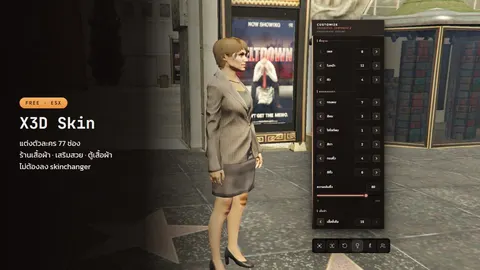
X3D Character Skin (free) merges both into one resource: 77 slots, orbiting camera that follows the slot, poses, character lighting, a button to hide players standing on top of you, barbers and clothing shops can open it with a restricted slot list, and the same export names (GetSkin / LoadSkin / LoadClothes / Change), so a shop or uniform system that pointed at skinchanger points at x3d_skin instead. No database required. Install docs.
ensure x3d_skin
# remove skinchanger and esx_skin
FAQ
My outfit is gone after relogging. The skin system did not save, or the core failed to save on disconnect. On ESX see ESX Legacy Core — X3D Build, which saves every 10 minutes and guards against corrupt saves.
Installed add-on clothes do not show in the menu. The system hardcodes ceilings; use one that asks the game at runtime.
How do I make a barber edit hair only? Use a system that accepts a slot list when opened; x3d_skin takes the allowed slots from the shop.
Does x3d_skin work on QBCore? The ped applier is plain natives and works on any core; the skinchanger-named exports are there so ESX servers migrate easily.
Related scripts