
FiveM Replay Script: watch any player back in game to settle reports and catch macros (ESX)
X3D Replay is a FiveM replay system for ESX that records every player automatically and lets admins watch it back in game with four cameras, a kill timeline, pressed keys and script usage. Covers privacy consent, storage, BETA price and the 7-day trial.
A player reports "he shot me after I surrendered". The usual next step is to ask for a clip, wait, and hope the clip shows the right moment. A cheating or macro report is worse: the suspect never sends a clip, and the logs only say what changed, not what the player did.
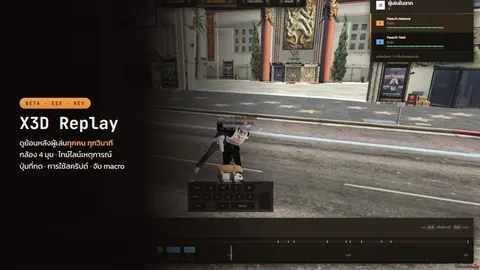
X3D Replay takes the clip out of the loop. It records every player automatically from join to leave, and an admin opens the replay in game: stand-in characters walk, shoot, get in cars and wear the same clothes as at the time.
Related scripts
Not the Rockstar Editor
Searching "replay editor fivem" usually finds the Rockstar Editor, the game's own client-side clip recorder that a player starts and edits on their own PC. X3D Replay is a different thing: a server-side script for admins. Nothing has to be started by the player, and the admin watches the session inside the server. If you want to record cinematic clips, you want the Rockstar Editor, and this post is not about it.
What it records and what you see
- Every player, every session, automatically — nothing to start
- In-game playback with the same clothes, face and poses as at the time
- 4 cameras: chase, player POV, free cam and map
- An event timeline for hits, kills and deaths; click one and playback jumps there
- Nearby players replay too, so you can follow anyone; speed from 0.25x to 8x
- A pressed-key panel and fire-click timing
- Commands, hotkeys and events the player used in other scripts (one line in that script's
fxmanifest) - Money, item and job changes logged from ESX automatically
What admins use it for
| Case | What you do |
|---|---|
| Reports ("shot after surrendering", random kills, hit-and-run) | Open that moment in the session and watch what happened |
| Cheats and macros | Compare the pressed keys with what happened in game; clicks that are too evenly spaced are flagged on the timeline |
| Script bugs | See which command and event the player sent before money or items changed |
| Evidence you want to keep | Anticheat, report and macro sessions are kept; other sessions expire after the number of days you set |
Other scripts can push events into the timeline too: exports.x3d_replay:Mark(src, 'report', {...}) puts an event on it and keeps the session.
Replay vs player clips, txAdmin logs and an anticheat
They are not rivals. Each answers a different question:
| Player clip | txAdmin / database logs | Anticheat | X3D Replay | |
|---|---|---|---|---|
| Needs the player to record | yes | no | no | no |
| Shows what happened in the world | only one view | no, text only | no | yes, 4 cameras, everyone nearby |
| Shows pressed keys and script commands | no | no | depends on the product | yes |
| Covers a moment nobody expected | no | partly | partly | yes, every session is recorded |
A log tells you money changed. An anticheat decides whether something looks like cheating. The replay shows you the minute around it so a human can decide. If you are choosing an anticheat, read FiveM anticheat, free vs paid, and for the groundwork you should do first, basic FiveM server security without an anticheat.
Privacy and the join consent card
Recording everyone is a rules question as well as a technical one. X3D Replay has a Config.Consent setting with three modes:
'card': a card on join where the player accepts recording'notice': players are only told'off': nothing is shown (put it in your server rules instead)
The card text is editable, and {days} fills in how long recordings are kept. Raise the Version value and everyone has to accept again. Every time someone opens a replay, it is written to the TB_X3D_REPLAY_ACCESS table (who watched which session, and when). Which groups can watch is set in Config.Viewer, or with the ACE permission x3d_replay.admin.
Where recordings are stored
Replay files stay on your own server, in x3d_replay/data/ by default (you can point Config.Storage at another folder). There are no open ports and no third-party host. Old files are removed for you after RetentionDays, except sessions kept by KeepKinds. When you update the script, keep the data folder or every old replay is lost.
The viewer is moved to their own routing bucket, so the watching admin is invisible to the live city and returns to where they were on exit.
Working with X3D Admin Panel and X3D Anti-Cheat
- X3D Admin Panel (free): when it is installed, the panel gets a replay menu. Pick a player in the table, open that player's session list, and you return to the panel when you close it. Permissions are set under panel roles (
mod.x3d_replay.players.view). How the panel fits next to txAdmin is in the free FiveM admin panel post. - X3D Anti-Cheat: it collects evidence for admins to decide on, and a replay adds what happened around that moment. Sessions marked
anticheatare kept permanently, and any script can mark a session through the export above. Each script is sold separately and neither needs the other.
Requirements
ESX Legacy and oxmysql. Run the bundled install.sql once on the database oxmysql uses (safe to run again), put the x3d_replay folder in resources/ without renaming it, and ensure it after oxmysql and es_extended. Type /replay as an admin to check it works. Step by step in the X3D Replay docs.
BETA price and the 7-day trial
X3D Replay is in BETA, with a special price of 599 THB, one shop_license for 1 IP, buy once and get every version. We keep the price low so more servers test it and report problems on Discord before the full release. Like every paid X3D script it has a free 7-day trial: see how the trial works and try it on your live server before you pay.
FAQ
Is this the Rockstar Editor? — No. The Rockstar Editor is a client-side clip tool. X3D Replay is a server script that records players for admins to review in game.
Do players have to start recording? — No. Everyone is recorded automatically from join to leave. Tell them through the join card, the notice, or your server rules.
Does it work with QBCore? — The listed requirements are ESX Legacy and oxmysql. Money, item and job logging comes from ESX, so use it on ESX.
Where do the recordings go? — Into the x3d_replay/data/ folder on your own server. Nothing is uploaded to another host.
Can I try it before buying? — Yes, the free 7-day trial gives you the full version.
Related scripts