
A free FiveM admin menu and panel: token bans, alt detection, player bags and logs — and how it pairs with txAdmin
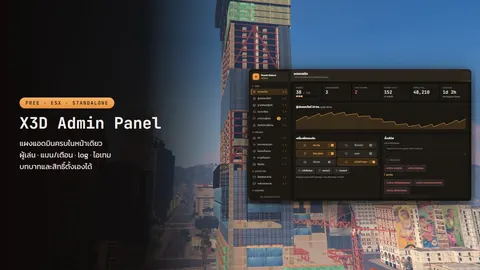
X3D Admin Panel is a free FiveM admin panel for ESX and standalone: manage players, invisible spectate, view bags and weapons, give money and items, ban on identifiers plus machine tokens so alt accounts can't get back in, a player database, money/item/chat logs, ranked roles, txAdmin ban import, and how to split the work with txAdmin.
Almost every city already runs txAdmin. But day-to-day admin work does not end at restarts and kicks: a player reports lost items and you need to open their bag, you compensate the whole server after a crash, you trace where a pile of money came from, and someone you banned is back on a fresh account five minutes later.
X3D Admin Panel is an in-game admin panel that does those jobs in one place. It is free, works with ESX out of the box and runs standalone too (Config.Framework).
Related scripts
Splitting the work with txAdmin
You don't have to choose. They work at different levels:
| Job | txAdmin | X3D Admin Panel |
|---|---|---|
| Start/stop/restart the server, scheduled restarts, console | use txAdmin | — |
| Start/stop/restart resources | yes | yes (with resources that may not be stopped) |
| In-game admin tools (noclip, spectate, teleport) | the basics | the full set + name tags, player blips, teleport to waypoint |
| View bags and weapons, give money/items/weapons | txAdmin is framework-agnostic | yes, per player or for everyone |
| Money, item, job and chat logs | — | yes, searchable per player |
| Bans and warnings | yes | yes: identifiers + machine tokens, new accounts from the same machine join the existing ban |
| Admin ranks | txAdmin panel permissions | in-game ranks; nobody acts on an equal or higher rank |
| Menus for your city's scripts | — | X3D scripts add their own pages |
A split that works well: txAdmin runs the server (restarts, console, updates), X3D Admin Panel runs the city (players, items, money, bans, logs).
Managing players
- Online list with job, money, ping and who is down
- Go to, bring, invisible spectate, revive, heal, freeze, kick
- View a player's bag and weapons, hold to take items back; item pictures can point at your inventory (x3d_inventory, ox, qb, qs, ps, esx_inventoryhud)
- Give or take money, items and weapons for one player or everyone online (give limits in
config/config.tools.lua)
Bans that actually keep people out
- Bans and warnings with a reason and a length, revocable any time
- Matched on identifiers and machine tokens (
Config.Sanctions.matchTokens): a fresh account on the same PC can't join and is added to the existing ban (spreadOnEvade); IPs are not used by default (matchIp) - Player database: everyone who ever joined, playtime, ban history, admin notes and the accounts sharing a machine
A caution for servers with many internet-café players: several people share one PC, so tokens repeat. If that is your player base, review spreadOnEvade and treat shared-machine accounts as supporting evidence before you decide. The reasoning is in basic FiveM server security without an anticheat.
Moving bans over from txAdmin
- Copy
txData/default/data/playersDB.jsoninto thex3d_adminpanelfolder (FiveM blocks reading files outside resource folders) - On the "Bans & warnings" page, hold the import-from-txAdmin button
- Delete the copied file right away: it holds every player's identifiers
The import can be undone if you change your mind.
Admin tools and emergency buttons
Noclip · name tags · player blips · god mode · invisible · teleport to waypoint · spawn/fix/delete vehicles · weather and time for everyone (or let the panel run the city's clock instead of a weather script) · announcements · a /report inbox · start/stop/restart resources
Emergency buttons for bad moments: save everyone, pull everyone out of instances, teleport everyone, store every vehicle. Save-everyone needs one ACE line in server.cfg (see installation). Use it before an emergency restart to cut item loss and the restart dupe window.
Logs from every system
The panel records money, items, jobs, chat and joins/leaves from ESX, plus X3D scripts' own logs and every admin action, searchable per player. Old rows are pruned automatically per config/config.logs.lua, and it can show another system's log table too. Your own scripts can log in one line:
TriggerEvent('x3d_admin:log', 'sell', source, { item = 'bread', amount = 5 })
Roles and permissions
Default ranks: owner (100) · superadmin (80) · admin (60) · moderator (40), or build your own on the "Roles & permissions" page. Nobody can act on an equal or higher rank, and every action is permission-checked on the server and logged. Offline admins keep their rank from panel roles, ACE or their ESX group.
Installation
- Put the
x3d_adminpanelfolder inresources/ - Add to
server.cfgafteroxmysql(andes_extendedon ESX):
ensure x3d_adminpanel
add_ace resource.x3d_adminpanel command.saveall allow
Database tables are created on first start. Open the panel with PAGEUP or /x3dadmin.
Who can open it: on ESX the superadmin and admin groups get a rank automatically (Config.GroupRoles), or grant it through ACE: add_ace identifier.license:xxxx x3d_admin.role.owner allow (ESX and standalone). The owner can then add people to ranks inside the panel.
Menus for X3D scripts
X3D scripts add their own pages to the panel: edit the X3D Daily Login reward calendar, send mail and create redeem codes for X3D Mailbox. Changes apply instantly, no restart. With X3D Replay installed (optional, paid, BETA), the panel also gets a replay menu: pick a player in the table and open their recorded sessions. Your own scripts can register a menu with TriggerEvent('x3d_admin:register', schema).
FAQ
Can it replace txAdmin? — Not recommended. Use both: txAdmin runs the server (restarts, console, schedules), X3D Admin Panel runs the city. Set txAdmin up properly with the txAdmin guide.
Does it work with QBCore? — It currently supports ESX and standalone (Config.Framework); there is no QBCore bridge yet.
PAGEUP does nothing. — That account has no rank yet. Check its ESX group (superadmin/admin) or add the ACE line from the installation steps.
Is it really free? Do I need a key? — Yes, it's free, and since version 1.0.1 it needs no license key: it works right after install. Download it from the product page; just don't resell it or re-upload it under your own name. The other free scripts are in free FiveM scripts.
Related scripts