
What is txAdmin and how to set it up: a txAdmin guide for FiveM server owners (scheduled restarts, HWID bans, in-game menu)
A 2026 txAdmin guide for FiveM servers: what txAdmin is, first login (port 40120 and the setup PIN), recipe-based server install, scheduled restarts and warnings, HWID bans, the /tx in-game menu, admin permissions, the events your scripts can use, and how to lock down the web panel.
txAdmin is the web panel and in-game menu for managing a FiveM server: start, stop and restart it, watch the console, schedule restarts, ban players and manage your whole admin team. It started in 2019 and, per its README, runs on more than 29,000 servers. The latest version at the time of writing is v8.1.1.
If you run a FiveM server you almost certainly have txAdmin already. This guide covers the parts worth setting up properly.
Related scripts
First login (txAdmin login)
- Run
FXServer.exe(Windows) orrun.sh(Linux) from the artifacts folder - The console prints the panel link and a PIN ("Use the PIN below to register")
- Open the link; the default port is 40120. Enter the PIN and create the master admin account. You can log in with a Cfx.re account or a password
- The PIN only exists while there are no admins. After that, log in with the account you created
All txAdmin data (config, logs, player database) lives in the txData folder. On Windows the default is next to the artifacts folder (../txData); change it with TXHOST_DATA_PATH.
Installing a server from a recipe
The Setup page has a recipe-based deployer ("create a server in under 60 seconds", per the README). Pick the recipe for the framework you want, and txAdmin downloads the resources, creates the database and writes server.cfg. The recipe list is fetched online, so names can change between versions.
Still on you afterwards: add your server key (free from portal.cfx.re), harden server.cfg as in basic FiveM server security, and replace starter scripts that won't hold up with many players (see what it costs to open a FiveM server).
Features to set up on day one
- Scheduled restarts: a list of
HH:MMtimes in Settings, e.g.06:00,18:00. txAdmin warns players 30, 15, 10, 5, 4, 3, 2 and 1 minutes before - Auto-restart on crash or hang: always leave it on
- Live console with history and search, CPU/RAM and player-count charts
- Activity log: joins and leaves, deaths, chat, explosions, and custom entries from your scripts
- Players: warnings, bans, whitelist, notes. Whitelisting can require Discord membership or a Discord role
- Discord bot: an auto-updating server status embed, a whitelist command and player info
Bans that keep people out (HWID)
txAdmin bans on identifiers and the machine's HWIDs. The setting is Required Ban HWID Matches (default 1: one matching HWID is enough to block), and Ban Templates give your whole team the same reasons and durations.
A caution for servers with many internet-café players: several people share a PC, so HWIDs repeat. Have an admin review unclear cases; the reasoning is in basic FiveM server security.
The in-game menu (txAdmin menu)
- Type
/txor/txadminin chat to open it - The menu key has no default binding; bind it under Settings → Key Bindings → FiveM
- Press Tab to switch menu pages
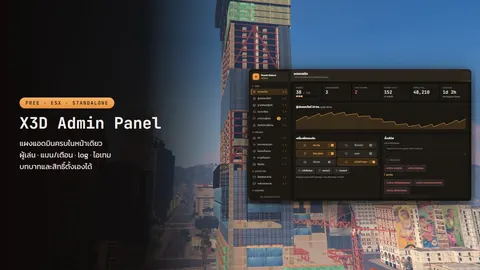
txAdmin's in-game menu covers the basics such as the player list, teleporting, spectating and healing. For viewing bags, giving items, money/item logs and in-game admin ranks, pair it with X3D Admin Panel (free), as covered in a free FiveM admin menu and panel, which can also import txAdmin's bans.
Admin permissions
Each admin gets their own permissions, stored in txData/admins.json. Examples: players.ban, players.warn, players.kick, console.view, console.write, control.server, settings.write, manage.admins and all_permissions.
The rule: grant only what each person needs. Regular admins don't need console.write or all_permissions, and everyone gets their own account. Never share the master account.
Events your scripts can use
txAdmin emits events to the resources on your server:
| Event | Data | Use it to |
|---|---|---|
txAdmin:events:scheduledRestart |
secondsRemaining |
lock the economy and save players before a restart |
txAdmin:events:serverShuttingDown |
delay (ms), author, message |
do a final save |
txAdmin:events:playerBanned |
targetIds, targetHwids, reason, expiration |
send ban logs to Discord or another system |
txAdmin:events:playerWarned |
targetIds, reason |
keep a history |
txAdmin:events:announcement |
author, message |
show announcements in your own UI |
Example economy lock before a restart:
AddEventHandler('txAdmin:events:scheduledRestart', function(eventData)
    if eventData.secondsRemaining <= 60 then
        economyLocked = true
    end
end)
(The old healedPlayer and skippedNextScheduledRestart events are deprecated since v8.0.)
Locking down the txAdmin panel
The panel controls everything; whoever gets in owns your server:
- By default it listens on
0.0.0.0:40120, reachable from anywhere. Firewall it to your team's IPs, or setTXHOST_INTERFACEto127.0.0.1and reach it through a VPN or an HTTPS reverse proxy - Change the port with
TXHOST_TXA_PORT(30120 is not allowed). The oldtxAdminPortandtxAdminInterfaceconvars are deprecated - Have admins log in with their own Cfx.re accounts instead of sharing passwords
- Keep
txDataprivate: every player's identifiers and every ban live indata/playersDB.json
FAQ
I can't log in to txAdmin / forgot the password. — If the master account is linked to Cfx.re, log in through Cfx.re. If txData/admins.json has no admin accounts, txAdmin shows a new PIN at startup (always back the file up before editing it).
The txAdmin menu doesn't open in game. — Your account must be a txAdmin admin and your identifiers must match the linked ones. Try typing /tx, since the key has no default binding.
How is txAdmin different from an in-game admin panel? — txAdmin runs the server (restarts, console, schedules, bans); an in-game admin panel runs the city (bags, items, economy logs). They work best together.
Does it cost anything? — txAdmin is free and ships with FXServer. What you may pay for is slots beyond Cfx.re's free limit; see what it costs to open a FiveM server.
Related scripts