
Free FiveM inventory UI for ESX: hotkey bag, vaults and trunks on one screen
A free FiveM ESX inventory set from X3D: X3D Inventory with big readable text, hotkeys 1–9 saved per character and coupon-based capacity, X3D Vault with levelled player vaults and job vaults, and X3D Vehicle Storage with trunk capacity by vehicle class and owner-only access. Everything is checked server-side against dupes. Install order and how to plug in your own storage script.
The bag is the screen players open most, and it is where Thai and international servers keep hitting the same problems: small text that is hard to read, hotkeys that vanish whenever someone changes PC or clears their cache, vaults and trunks that are separate scripts with separate looks, and items duplicated by gives or deposits fired at the same moment.
X3D gives away three scripts designed to work together: one screen, one set of rules, free.
Related scripts
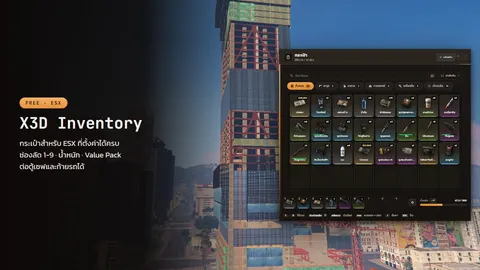 X3D InventoryFree ESX inventory with big readable text, hotkeys 1–9 saved per character, coupon-based capacity and a storage panel for any vault or trunk script.Free
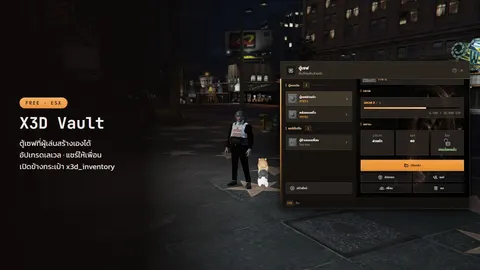 X3D VaultFree ESX vaults on the x3d_inventory screen: player vaults with levels and sharing, job vaults per society, Thai and English.Free
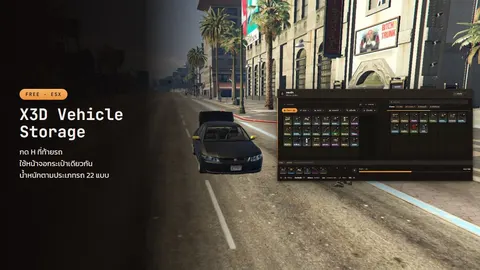 X3D Vehicle StorageFree ESX trunk storage on the x3d_inventory screen: capacity by vehicle class and model, owner-only access, job cars and an admin view.Free
What is in the set
| Script | Job | Key | Needs |
|---|---|---|---|
| X3D Inventory | main bag, hotkeys 1–9 | T |
es_extended, oxmysql |
| X3D Vault | player and job vaults | E at a vault |
+ X3D Inventory |
| X3D Vehicle Storage | trunks | H at the back of a car |
+ X3D Inventory |
Vaults and trunks open as a panel next to the bag, and items move the same way everywhere, so players learn nothing new.
X3D Inventory: a bag that reads clearly and remembers
- Big text, big icons with rarity colours, drag and drop, stack split, double-click to use, right-click for the item menu
- Hotkeys 1–9 saved with the character in the database, not on the player's PC. A new computer, a reinstall or a cleared FiveM cache keeps them
- Capacity that grows: set starting slots and weight in
config/capacity.lua, raise them permanently with slot/weight coupons or for some days with a Value Pack, which makes a good event reward - Switch parts off one by one: durability, weight, slot count, stack limit
- Thai or English with
Config.Locale = 'th'or'en'; item descriptions take both
X3D Vault: vaults with levels, plus job vaults
Player vaults: players create their own (you choose the item it costs), name, rename or delete them, and each gets a code such as #7WT6:
- Level up with an upgrade card; each level sets slots, weight and what may be stored (money, items, weapons)
- Share with nearby players, see who has access, revoke it
- Limit how many vaults each player may own
Job vaults: one per job, such as police or EMS, open only to that job. You set every location, safe model, blip and label. Labels above the vault use the bundled Thai font, nothing else to install.
X3D Vehicle Storage: trunks where nothing goes missing
- Capacity for all 22 GTA vehicle classes (sedans, SUVs, vans, motorcycles…), overridable per model, 0 for no trunk, or off for whole classes (cycles, trains)
- Owner-only, checked server-side against the vehicles table · locked cars stay closed except for jobs you allow · job vehicles open for everyone in that job (police, ambulance, mechanic, configurable)
- Undroppable items are blocked automatically, plus your own blacklist
- Optional glovebox from the front of the car (
Config.EnableGlovebox) /trunkadmin <plate>for admins · open from a garage menu withexports.x3d_vehiclestorage:OpenRemote(plate)· storage of vehicles that no longer exist is cleaned up automatically
Dupe protection: the whole set checks on the server
Most item dupes happen between "check the player has it" and "move it": two requests land at once and the item leaves twice. The set closes that gap everywhere:
- Bag: use, give, drop and bag search check amount, distance and permission on the server, a lock stops double gives, and each item can have its own cooldown
- Vault: the player must stand at the vault, amounts are whole numbers, access and bag space are verified, and the vault is locked while items move, so two players pressing at once can't double-spend
- Trunk: distance to the car, whole-number amounts, trunk weight and bag space are checked every time
The same rules apply to every script that moves money or items; the full version with example code is in basic FiveM server security without an anticheat.
New in X3D Inventory 1.1.0: weapon skins and a Thai font that actually loads
- Works with X3D Weapon Skins (optional): a "Change skin" right-click entry, a "Skins" header button, a skin tag on the slot and tooltip rows showing the base weapon and damage. After a skin change the weapon stays in hand and hotkeys follow. More in free FiveM weapon skins and a weapon damage script
- One font for Thai and English (Kanit), self-hosted
- Fixed the Thai font never loading in game: the previous build wrote
format(woff2)unquoted, which FiveM's Chromium 103 rejects, so text fell back to the system font
Installing the whole set
- Stop your old inventory so only one runs
- Put
x3d_inventory,x3d_vaultandx3d_vehiclestorageinresources/(keep thex3d_inventoryfolder name; item pictures and exports rely on it) - Run each
install.sqlon your ESX database (existing items are never overwritten) - Order them in
server.cfgafteres_extended:
ensure oxmysql
ensure es_extended
ensure x3d_inventory
ensure x3d_vault
ensure x3d_vehiclestorage
- Set vault locations in
config/VAULT/config.group.lua(player vaults) andconfig/VAULT/config.society.lua(job vaults). If your vehicles table isn'towned_vehicles, setConfig.OwnedVehiclesTable
Adding your own items: add them to the ESX items table and drop a lowercase PNG named after the item at web/build/img/items/<item>.png (92×92, transparent background).
Plugging in your own vault or stash script
Any storage script can drive the bag's panel through 3 client exports. Saving and permission checks stay in your script:
exports.x3d_inventory:SetCurrentVaultData({
    events = { store = 'myvault:store', take = 'myvault:take', close = 'myvault:close' },
    args = { vaultId },
})
exports.x3d_inventory:UpdateStorageData({ inventory = items, label = 'Vault', weight = 10, maxWeight = 100 })
exports.x3d_inventory:OpenStorage()
Without events the bag refuses the drag, so nothing is lost. Job scripts can show a durability bar on a slot with RegisterDurabilityProvider.
FAQ
Which key opens the FiveM inventory? — X3D Inventory uses T (set in Config.OpenKey). Players can rebind it under Settings → Key Bindings → FiveM. If the bag screen gets stuck, type /closebag.
Can I run it alongside ox_inventory? — No. X3D Inventory replaces your main inventory and uses the ESX items table, so pick one. The vaults and trunks in this set need X3D Inventory.
Do hotkeys disappear on a new PC? — No. They are saved with the character in the server database, not on the player's machine.
Can admins search a player's bag? — Yes, with /x3dinv <id> (groups in Config.SearchGroups), or view bags and weapons in X3D Admin Panel, whose item pictures can point at x3d_inventory.
Is it really free? — Yes, the whole set. Edit the code as you like; just don't resell it or re-upload it under your own name. Download from each product page; the other free scripts are in free FiveM scripts.
Related scripts
- X3D InventoryFree ESX inventory with big readable text, hotkeys 1–9 saved per character, coupon-based capacity and a storage panel for any vault or trunk script.Free
- X3D VaultFree ESX vaults on the x3d_inventory screen: player vaults with levels and sharing, job vaults per society, Thai and English.Free
- X3D Vehicle StorageFree ESX trunk storage on the x3d_inventory screen: capacity by vehicle class and model, owner-only access, job cars and an admin view.Free