
Free FiveM weapon skins and a weapon damage script: a tradable skin collection, headshot kills, bleed, stun and lifesteal
Free FiveM ESX weapon skins (X3D Weapon Skins): unlock skins with items into a permanent collection, damage always equals the base weapon, turn tradable skins back into items to trade or sell. Plus a free weapon damage script (X3D Damage): per-weapon damage, headshot kills, bleed, slow, stun, knockdown and lifesteal, on ESX or standalone. How to add new skins and what to know about anticheat.
Gun-focused cities care about two things most: weapons that look unique and fights that feel fair. Most shared gun skins, though, are separate weapon files whose damage doesn't match the base gun, and GTA's default damage makes some weapons strong enough to break a city's balance.
X3D gives away two scripts designed to work together, both free.
| Script | What it does | Runs on |
|---|---|---|
| X3D Weapon Skins | collectible weapon skins unlocked by items, equip any time, same damage as the base weapon | ESX Legacy |
| X3D Damage | per-weapon damage, headshot kills, and bleed, slow, stun, knockdown and lifesteal effects | ESX or standalone |
Related scripts
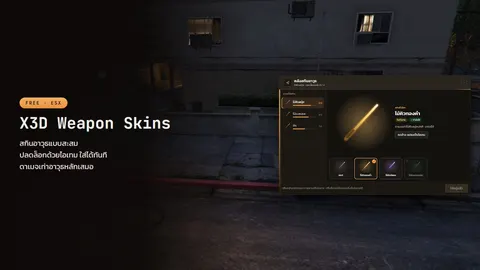 X3D Weapon SkinsFree collectible ESX weapon skins: each skin is an add-on weapon tied to its base gun. Unlock with an item, same damage, tradable, held-weapon effects.Free
 X3D DamageSet every weapon's damage yourself, with bleed, slow, stun, knockdown and lifesteal effects. Weapon skins supported. ESX or standalone.Free
X3D Weapon Skins: a collection players want to fill
Each skin is an add-on weapon tied to a base weapon, for example WEAPON_GOLDPOOLCUE as a skin of WEAPON_POOLCUE. The skin model is streamed in as a new weapon; it does not overwrite the original weapon files (it is not a replace). The original gun stays in the game, and players without the skin still see and use the normal weapon. Equipping a skin swaps the weapon in hand for that add-on weapon, carrying ammo, attachments and tint across; unequipping swaps back to the base weapon.
X3D Weapon Skins does not ship skin models. Use add-on weapon models your city already has or gets elsewhere, and tie as many as you like to their base weapons in config/skins.lua.
A skin is part of a collection, not another gun to keep track of. Using a skin item from the bag unlocks the skin into the player's permanent collection (the x3d_weaponskins table), and they can equip it on the weapon any time. Damage, weight and ammo always come from the base weapon, so a skin can never be stronger than the normal gun.
- The collection screen shows the selected skin large, a choice strip below and per-weapon collection progress on the left. Unlocking plays a reward card with a warm glow and sparks. Open it with
/skins - Tradable or bound forever: hold the button on a tradable skin to turn it back into an item and sell it on. Skins set to
tradable = falsestay in the collection forever, and a skin is never lost with the weapon - Held-weapon effects: give each skin its own light or particle effect (
vfx) - Rarity 0–5 with frame colours
No dupes, no skins without an unlock
- Every unlock, equip and convert is checked on the server with a per-player lock, so spamming the button never duplicates anything
- A skinned gun that reaches someone who never unlocked it (given, dropped, stored) turns back into the normal weapon
- Changing skin never strips attachments or tint
Works with X3D Inventory
X3D Inventory 1.1.0 supports skins with nothing to configure: a "Change skin" right-click entry, a "Skins" header button, a skin tag on the slot, and tooltip rows showing which weapon it is a skin of and its damage. After a skin change the weapon stays in hand and hotkeys follow. With any other inventory there are several ways in (version 1.1.0):
- The
/skinscommand or theConfig.Keyhotkey - An opener item,
Config.OpenItem, for any inventory that supports ESX usable items (NC, ox, qs…); it is not consumed - A "Weapon skins" entry in the ox_lib radial menu (
Config.Radial) - Your own menu, through
exports.x3d_weaponskins:Open(), withHooks.BeforeFocusto close your inventory before the collection opens
Adding a new skin
- Stream the add-on weapon model yourself (
weapons.metaetc.) - Add the weapon to es_extended
Config.Weapons, copying the base weapon'scomponents/tints, or a weapon with attachments can't take the skin - Add the item to the
itemstable and put aweapon_<name>.pngpicture whereConfig.ImagePathpoints - Add a row in
config/skins.lua(base,item,label,rarity,tradable,vfx) and restart. Players reconnect once to load new models
Selling skins in your city: every skin is a normal item, so give or sell it through whatever your city already uses, such as an in-city shop or redeem codes in X3D Mailbox.
X3D Damage: balance a gun-focused city
Set each weapon's damage and effects in config/weapons.lua. Weapons you don't list keep the game's damage. No ox_lib required.
| Part | What it does |
|---|---|
| Per-weapon damage | damage per hit, headshotKill, blockInstantKill (no heavy melee) |
| Effects | bleed (stops when healed), slow, stun, knockdown with blur, bonus damage, armour pierce, lifesteal. Every effect takes a chance and can be headshotOnly |
| Lifesteal | the server checks range, the weapon in hand and a cooldown before healing the attacker |
| Helmets / armour | Hooks.OnHeadshot lets your helmet script block headshots |
| Jump-dodge guard | holding jump blocks attacking for a while |
| Weapon skins | skinned weapons use their base weapon's row automatically through GlobalState.x3dWeaponBase, published by X3D Weapon Skins |
Effect parameters (from the script's docs):
| Effect | Parameters |
|---|---|
bleed |
perTick, ticks, intervalMs |
slow |
mult (0–1), seconds |
stun |
seconds, ragdollMs |
knockdown |
pulses, headshotPulses, ejectBelowSpeed (pull out of slow vehicles) |
bonus |
damage |
pierce |
damage, minArmor |
lifesteal |
heal, healChance |
A note on anticheat
Every client-side damage script shares one limit: the victim's own client applies the damage. X3D Damage's docs say it plainly: pair it with an anticheat health check (god mode detection). More in basic FiveM server security, and see X3D Anti-Cheat. Lifesteal is the one effect that heals the attacker, so it is checked on the server every time.
Installing both
ensure es_extended
ensure x3d_inventory
ensure x3d_weaponskins
ensure x3d_damage
- X3D Weapon Skins: run
install.sqlfirst (creates thex3d_weaponskinstable) and start it afteres_extendedand your inventory. With X3D Inventory, setHooks.CanCarryto callexports.x3d_inventory:CanCarryItemSrcand pointConfig.ImagePathat x3d_inventory's pictures - X3D Damage: drop the folder in,
ensure x3d_damage, editconfig/weapons.lua, and setConfig.Frameworkto'auto','esx'or'standalone'
FAQ
Are skins add-on or replace? — Add-on. Each skin is a separate add-on weapon tied to a base weapon, the original gun is never overwritten, and no skin models ship with the script: you bring your own.
Do skins make guns stronger? — No. Damage, weight and ammo always come from the base weapon, and X3D Damage reads the base weapon's row for skinned guns automatically.
Does it work with QBCore? — X3D Damage runs standalone. X3D Weapon Skins is for ESX Legacy.
If a player loses the gun or gets robbed, is the skin gone? — No. The skin lives in the player's collection, not on that particular gun.
Do I need X3D Inventory? — No. Any inventory works (NC, ox, qs…) and the collection opens with /skins, an opener item or the ox_lib radial menu, but with X3D Inventory players change skins right from the bag.
The other free scripts are in free FiveM scripts.
Related scripts
- X3D Weapon SkinsFree collectible ESX weapon skins: each skin is an add-on weapon tied to its base gun. Unlock with an item, same damage, tradable, held-weapon effects.Free
- X3D DamageSet every weapon's damage yourself, with bleed, slow, stun, knockdown and lifesteal effects. Weapon skins supported. ESX or standalone.Free