
FiveM UI Lag Fix: Why NUI Eats FPS and How to Stop It (2026)
UI lag in FiveM: FPS drops when the inventory opens, notifications arrive late, the HUD stutters. The real causes are several NUIs rendering at once, messages sent every frame, fonts and CSS loaded from the internet, and progress bars that do not lock other UIs. How to measure it, and the free UI scripts that already fix it.
Players say "the server is laggy", but the server pings 20 ms with 70% CPU free. Almost every time the problem is client-side UI, not the server. Every NUI is a Chromium web page running on top of the game; the more of them, and the more that work all the time, the more frames you lose. This post shows how to find the culprit and what a good UI has to do.
Related scripts
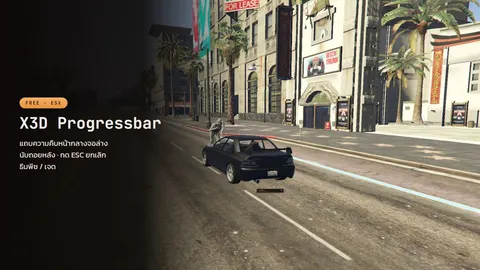 X3D Progress BarA peach-themed progress bar with ESC to cancel, a countdown, an automatic hotkey lock, and a bundled Thai font.Free
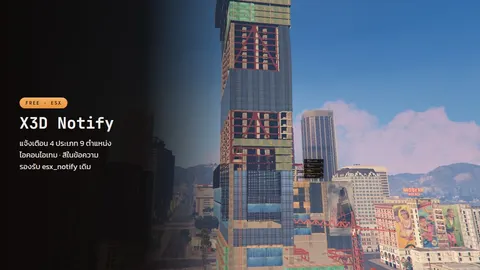 X3D NotifyNotification cards in nine positions, with item icons and rarity frames, and full Thai support.Free
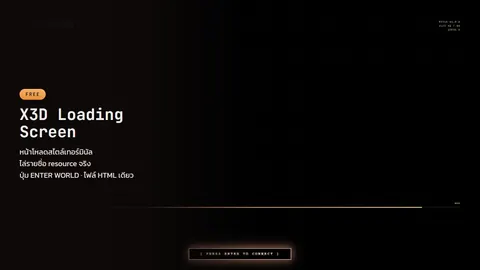 X3D Loading ScreenA terminal-style loading screen with an ENTER WORLD button the player presses before spawning. One HTML file, no build step.Free
Measure which one is eating
- Press F8, type
resmon 1: a per-resource client CPU table in ms. Anything above 0.1 ms while standing still is suspicious - Watch
resmonwhile a UI is open (inventory, menu). If a resource jumps from 0.05 to 2–5 ms, that UI sends messages too often or paints too much stop <resource>one at a time and watch the frame rate; you find the culprit within five minutes- Count the NUIs that stay open: HUD, notifications, progress bar, menu, inventory, phone. If each is a full Vue/React app and renders all the time (
SetNuiFocusis irrelevant; rendering alone costs), six of them take 15–20 FPS on a mid-range machine
Six common causes
1. SendNUIMessage every frame
Many HUDs push health/hunger/money to the NUI inside while true do Wait(0): JSON serialisation plus a cross-process hop 60 times a second for one HUD. Fix: send only when a value changes, and Wait(200–500) for anything that is not real-time
2. Fonts / CSS / JS loaded from the internet
A UI that @imports Google Fonts or pulls a CDN waits on the network on first open, and on blocked or slow connections renders boxes instead of Thai (or any non-Latin) glyphs. Every asset must ship inside the resource. X3D Notify and X3D Progress Bar embed Noto Sans Thai and make zero outbound requests
3. Overlapping NUIs
The old esx_notify and the new one running together show notifications twice and cost double. Remove the old one entirely; if legacy scripts call exports['esx_notify'], use the 12-line forwarder in X3D Notify's optional/ instead of running two
4. Progress bars that do not lock other UIs
During a repair the player can open the inventory, the menu and the phone; three or four UIs render at once, which both eats frames and opens dupe windows. The fix is a progress bar that announces its state. X3D Progress Bar sets the LocalPlayer.state.minigame state bag and fires x3d_progressbar:active; every other UI checks one line:
if LocalPlayer.state.minigame then return end
5. Heavy animation / blur / backdrop-filter
Full-screen backdrop-filter: blur() and stacked box-shadows on elements that move every frame force the Chromium layer over the game to recomposite the whole screen. Blur only small boxes, animate with transform/opacity instead of top/left, and set will-change only while animating
6. UIs that are not really closed
Hidden with display:none in JS while Lua keeps sending messages and Vue stays reactive. Stop the Lua loop too when the UI closes
What a good UI needs
| Requirement | Why |
|---|---|
| Embedded fonts | No tofu boxes, no waiting on the network |
| Zero outbound requests | First open does not hang |
| Messages only on change | No frame cost while idle |
| Announces state (state bag) | Other UIs stop overlapping on their own |
| Cancellable (ESC) | Players never get stuck in a bar |
| Drop-in replacement without script edits | Switching does not break the server |
X3D's three free UI scripts meet the table: X3D Notify replaces esx_notify · X3D Progress Bar replaces esx_progressbar · X3D Loading Screen replaces esx_loadingscreen. The forwarder-based switch is in the stock ESX UI comparison.
For players whose FPS is low on every server (not just yours), send them FiveM low FPS fixes to tune their PC.
Want a branded UI?
Only need a new inventory screen? A free one built on these rules: free FiveM inventory UI with vaults and trunks.
For a HUD, menu or inventory designed for your server, X3D builds custom UI/NUI in Vue following the rules in this post: embedded fonts, no outbound requests, change-only messages, resmon measured before delivery.
FAQ
Changed the HUD, still laggy? Measure resmon again. The eater is usually not the HUD but a script looping on Wait(0), such as one drawing 3D markers for every point in the city at once.
Do graphics settings help? They help the game, not the NUI. NUI runs on CPU/Chromium separately from the game renderer.
Can I disable all NUIs? Only while debugging: stop them one by one, or use nui_devtools to profile each page.
Related scripts
- X3D Progress BarA peach-themed progress bar with ESC to cancel, a countdown, an automatic hotkey lock, and a bundled Thai font.Free
- X3D NotifyNotification cards in nine positions, with item icons and rarity frames, and full Thai support.Free
- X3D Loading ScreenA terminal-style loading screen with an ENTER WORLD button the player presses before spawning. One HTML file, no build step.Free